

Free Download Manager 6.35.2
Free Download Manager 6.35.2 is a free, open-source download manager for Windows, macOS, Linux, and Android, released September 22, 2026 with stability improvements, a "Download later" button, component updates, and a fix for broken preview image generation caused by an FFmpeg build issue. It supports HTTP, HTTPS, FTP, BitTorrent, and magnet links, accelerates downloads by up to 10x through multi-threaded splitting, resumes broken downloads, schedules transfers, and integrates with all major browsers. Available in 30+ languages, it includes a portable version and media conversion tools. It's the best free alternative to paid tools like Internet Download Manager and remains actively developed with no ads, no subscriptions, and no bundled junk.
- Free
- Windows
- macOS
- Linux
- Android
- Nov 9, 2026
053c7917c490984fb93c8cc74f40ada7dc83f1653438520e96b42a4aff69a5d8VirusTotal report ↗df1688591eb11bf4d9047b3cae44b66d7cd977a7650d79a44b997a2ed05cf5b0VirusTotal report ↗619c8ec59d11a98f486f6e728b476289a3d75553e1f77da742081b67ad03050eVirusTotal report ↗Screenshots
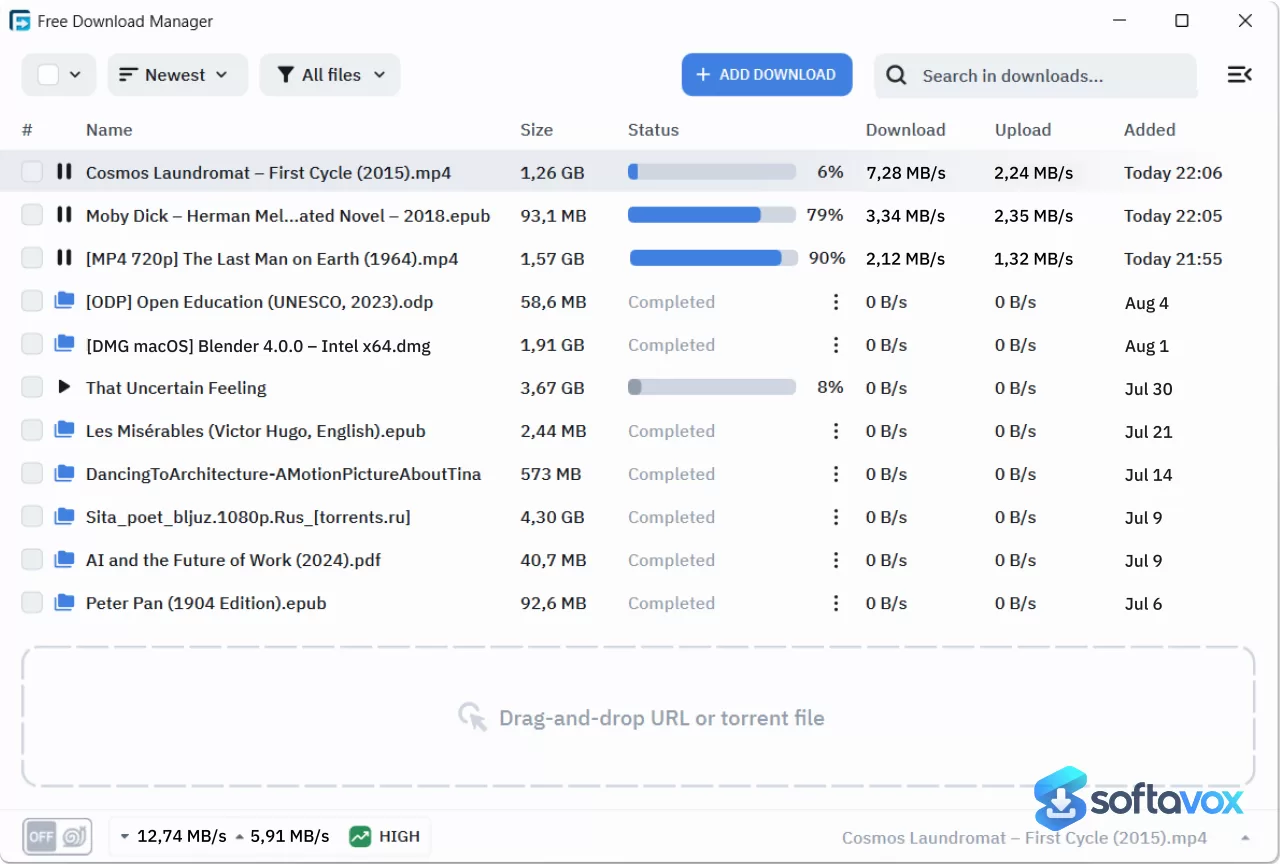
About Free Download Manager
Free Download Manager Download, Fast, Free Download Accelerator
TL;DR Quick Take / Who is this for?
Free Download Manager (FDM) is a free, cross-platform download accelerator that splits files into segments and downloads them simultaneously to maximize your available bandwidth. It supports HTTP/HTTPS downloads, BitTorrent, magnet links, and video/audio files, and it can resume broken or interrupted transfers reliably. The current release is version 6.35.2, and the software is available for Windows, macOS, Android, and Linux, with installer sizes ranging from around 46 MB to 60 MB depending on the platform. The core appeal is straightforward: FDM consistently outperforms browser download managers, it is ad-free and completely free, and its pause/resume functionality is widely praised for its reliability. The trade-offs are significant and well documented. The official browser extension has been widely criticized for forcing anonymous data collection and automatically uninstalling itself if you decline, which is a serious privacy concern for many users. Some users also report that pausing downloads for extended periods can break the transfer entirely, requiring a restart. FDM is the right pick for users who want a fast, free, and feature-rich download manager for large files, torrents, and media, and who are prepared to navigate its privacy settings carefully. It is not the best choice for anyone who is unwilling to accept data collection, or who needs a completely clean, controversy-free installer.
Quick Info Box
| License Type | Freeware (100% free, ad-free, open source) |
|---|---|
| File Size | Approx. 46 MB (Windows 64-bit); 60 MB (macOS Intel); 58 MB (Android 64-bit APK); 34 MB (Linux DEB) |
| OS Compatibility | Windows 11/10/8.1/8/7, macOS, Android 9+, Linux (Ubuntu/Debian) |
| Latest Version | 6.35.2 |
| Developer | SoftDeluxe, Inc. / FreeDownloadManager.ORG |
Key Features & Real-World Usability
FDM’s core workflow is built around accelerating downloads by splitting files into multiple sections and downloading them in parallel. The software claims up to 10x faster speeds, and while real-world results depend on your network and the server, users consistently report that FDM outperforms browser-based downloads, sometimes dramatically. The BitTorrent client is fully featured, with support for magnet links, file prioritization within torrents, and bandwidth management. The download scheduler lets you queue transfers for specific times, and the traffic usage modes, including a “snail mode” that reduces speed while you browse or make calls, are genuinely useful for managing shared connections. Browser integration is another strength. FDM works with Chrome, Firefox, Edge, and other popular browsers, and it can intercept downloads automatically. The interface is clean, simple, and beginner-friendly, with a dark theme available. File organization by type is automatic, placing downloads into predefined folders, and you can assign custom folders for different categories. The limitations are equally clear. The official browser extension is the most controversial component. Multiple reviewers report that the extension forces anonymous data collection and auto-uninstalls if you decline, with one user calling it “insanity” and another stating it “won’t even let you install it unless you agree to let them spy on you”. The Android app also contains an analytics tracker according to Exodus Privacy, and it requests permissions including camera, microphone, and Bluetooth, which are broader than a download manager typically needs. Reliability issues are another recurring theme: some users report that pausing a download for too long breaks the transfer and forces a restart, and others note that the extension frequently stops downloads or becomes unresponsive.
- Multi-threaded download acceleration: Splits files into segments and downloads them simultaneously, with users reporting speeds that often outperform browsers and other download managers.
- Built-in BitTorrent client: Full support for torrents and magnet links, with file prioritization, bandwidth control, and scheduling.
- Reliable pause and resume: Interrupted downloads resume from where they left off, with users consistently praising the reliability of this feature.
- Download scheduling and traffic management: Queue downloads for specific times and adjust bandwidth usage, including a “snail mode” for times when you need the connection for other tasks.
- Broad platform support: Native applications for Windows, macOS, Android, and Linux, with consistent features across platforms.
- Automatic file organization: Downloads are sorted by type into predefined folders, with customizable categories and destinations.
- Browser integration: Works with Chrome, Firefox, Edge, and other browsers to intercept and accelerate downloads automatically.
- Video and audio format support: Handles popular media formats including WEBM, AVI, MKV, MP4, and MP3, with a video conversion plugin available for the Lite version.
Pros, Cons & Community/User Feedback
User sentiment around FDM is strongly positive on performance and value, but sharply critical of its privacy practices, particularly the browser extension. The core application enjoys excellent reviews: on Chrome Stats, the FDM app holds a 4.71 average from 53,911 ratings, with users praising “very fast download speeds, often outperforming browsers,” reliable pause/resume, and a “clean, beginner-friendly interface”. On Google Play, the app has 53.6K reviews, and one user describes it as “amazing” with a “clean, simple, and easy to use” UI that offers useful features like download scheduling and managing multiple downloads. The Gizmodo review highlights its ability to organize downloads, schedule transfers, and manage bandwidth without overwhelming the user. The positives are consistent: FDM is fast, free, ad-free, and genuinely useful for large files and torrents. The complaints are equally consistent and center on two issues. First, privacy and data collection: the official browser extension has a 4.08 average, but recent reviews are far more negative, with users reporting that it “forces anonymous data collection and auto-uninstalls if declined”. One reviewer on Chrome Stats states plainly, “Good plugin but won't let you install the plugin unless you agree to let them spy on you?!?! Insanity.” The Exodus Privacy report for the Android app confirms the presence of an analytics tracker and 15 permissions, including camera, microphone, and Bluetooth, which are broader than necessary for a download manager. Second, reliability edge cases: some users report that pausing downloads for extended periods breaks the transfer, and the extension can be unstable, with downloads stalling or dialogs becoming unresponsive. The practical takeaway is that FDM’s core download engine is excellent and delivers on its speed promises, while the browser extension’s forced data collection and the Android app’s broad permissions are the areas where user trust is most strained.
Pros
- Very fast download speeds, consistently outperforming browser download managers
- Reliable pause and resume functionality for interrupted transfers
- Built-in BitTorrent client with magnet link and file prioritization support
- Completely free and ad-free, with no premium tier or feature paywalls
- Clean, beginner-friendly interface with a dark theme
- Cross-platform support for Windows, macOS, Android, and Linux
- Download scheduling and bandwidth management, including a “snail mode”
- 4.71 average rating from over 53,000 Chrome Stats reviews
Cons
- Browser extension forces anonymous data collection and auto-uninstalls if declined
- Android app contains an analytics tracker and requests broad permissions (camera, microphone, Bluetooth)
- Pausing downloads for extended periods can break the transfer and require a restart
- Browser extension can be unstable, with downloads stalling or dialogs not responding
- Some users find the mobile app’s settings too limited compared with desktop
Final Verdict & Safe Download Advice
Free Download Manager is a genuinely capable download accelerator that delivers on its core promise: it is fast, free, and effective at downloading large files and torrents. The core application is well-regarded, the pause/resume functionality is reliable, and the built-in BitTorrent client is a significant convenience. For users who need a dedicated download manager for large files, media, or torrents, FDM is one of the best free options available, and it works across all major platforms. The caveats are serious enough to change the decision for some users. The browser extension’s forced data collection is a real privacy issue, and the Android app’s broad permissions are broader than necessary for a download manager. If you are comfortable using the desktop application without the extension, or if you are willing to accept the data collection, FDM delivers excellent value. If privacy is a priority, you may want to look at alternatives that do not require data collection to function. Download FDM only from the official site, and be aware of the extension’s behaviour before you install it.
- Download only from freedownloadmanager.org: The official site distributes the installers directly. Third-party “FDM download” portals may repackage the installer with unwanted software, and the official site is the only source that guarantees you are getting the vendor-signed package with published checksums.
- Verify the installer size and version: The Windows 64-bit installer is approximately 46 MB, the macOS Intel DMG is around 60 MB, and the Android 64-bit APK is around 58 MB. The current version is 6.35.2. A dramatically smaller file or an older version number is a warning sign.
- Check system requirements before installing: FDM requires Windows 11/10/8.1/8/7 (64-bit for the current release), macOS, Android 9 or later, or a Debian-based Linux distribution. Older Windows versions require the FDM 6.24 or 5.1.38 builds.
- Be aware of the browser extension’s data collection: The official extension requires you to accept anonymous data collection to install, and it will uninstall itself if you decline. If you do not want to accept this, use the desktop application without the extension and manage downloads manually.
- Review the Android app’s permissions: The Android version requests camera, microphone, Bluetooth, and other permissions that are broader than a download manager typically needs. Check the permission list before installing and disable any that you are not comfortable granting.
- Do not use “cracked” or “Pro” versions: FDM is already free and ad-free, so there is no functional reason to risk a repacked installer. Cracked downloads are a common malware vector, and the official free version already provides the full feature set.
Similar software


Key features
- Browser Integration, Automatically detects download links
- Multi-Threaded Acceleration, Splits files for up to 10x faster downloads
- BitTorrent Support, Handles magnet links and large torrents
- Resume Interrupted Downloads, Recovers from poor connection stability
- Download Scheduling, Set downloads for later when bandwidth is free
- Media Conversion, Converts video files after download
- Portable Version, No installation required
- Open-Source, Source code available for review
- No Ads or Bloatware, Clean installer, no Pro upsell prompts
- Protocol Support, HTTP, HTTPS, FTP, BitTorrent, magnet links
- 30+ Languages, Localized interface
Frequently asked questions about Free Download Manager
Is Free Download Manager safe to use?
Is Free Download Manager really free?
Which systems does Free Download Manager run on?
What is Free Download Manager used for?
Does Free Download Manager work with BitTorrent?
How do I update or uninstall Free Download Manager?
Versions
| Version | Release date | Platform | File size | |
|---|---|---|---|---|
| Free Download Manager 6.35.2 Latest version | Oct 11, 2026 | WindowsLinuxmacOSAndroid | 49.0 MB | Download |
Comments about Free Download Manager
No comments yet. Share your experience with this program!